Crossover Church Flyer Template PSD: A Designer's Guide
You know the feeling. A major event is on the calendar—maybe a new sermon series, a community outreach day, or a youth conference. The message is solid, the plans are set, but the promotional materials are still a blank canvas. For churches and community organizations, creating visually compelling graphics that are both professional and aligned with their message can be a significant hurdle. This is where a well-crafted resource like the Crossover Church Flyer Template PSD becomes invaluable, acting as a bridge between a great idea and a polished, shareable design.
Deconstructing the Modern Ministry Flyer
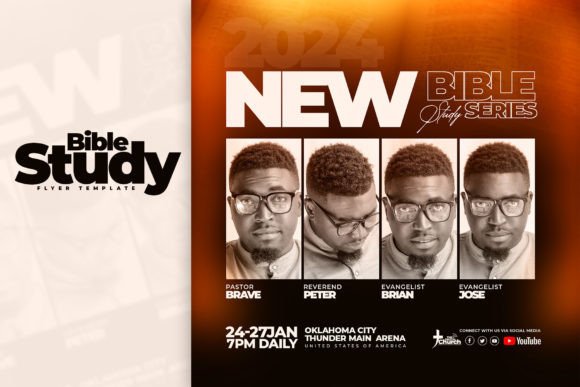
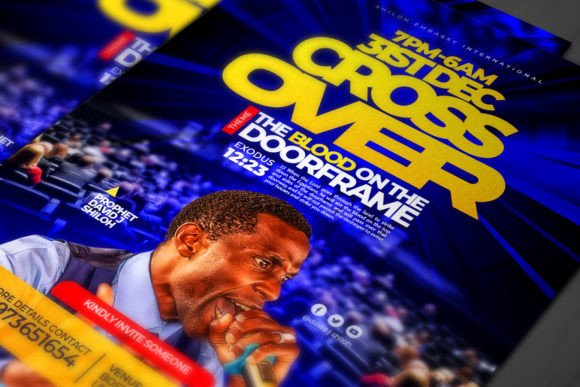
At its core, this template isn't just a static image; it's a structured design system built for clarity and impact. The visual personality is decidedly modern and approachable. It avoids overly ornate or traditional religious iconography, instead favoring a clean, minimalist aesthetic that feels fresh and relevant. This style relies on strong typographic hierarchy, thoughtful use of space, and a balanced color palette to convey a sense of calm authority and welcoming energy. The appeal lies in its versatility—it feels equally at home promoting a contemporary worship service, a community potluck, or a leadership summit.
The template's strength is in its Adobe Photoshop (PSD) format and organized structure. Every element—text blocks, background layers, decorative icons—resides on its own layer within clearly labeled folders. This is a game-changer for customization. You're not locked into the designer's original vision. Want to swap a stock photo for an image of your congregation? Use the Smart Object layer. Need to adjust the color scheme to match your church's brand identity? The color layers are separate and easily edited. This level of control transforms the template from a simple graphic into a genuine design asset for your creative toolkit.
Typography That Speaks Volumes
A flyer's success often hinges on its typography. The fonts chosen for this template—Montserrat and Asem Kandis—create a compelling and functional pairing. Montserrat, a geometric sans serif font, is the workhorse. Its clean lines and excellent legibility make it perfect for body text, event details, and calls to action. It embodies modern typography principles, ensuring information is easy to read at a glance, whether on a printed bulletin or a social media feed.
In contrast, Asem Kandis provides a touch of elegance and personality. It functions as a display font, ideal for headlines, event titles, or a key pull quote. While not a traditional script font, it has a fluid, crafted quality that adds warmth and distinction. This pairing is a masterclass in visual hierarchy: the sans serif grounds the information, while the display font draws the eye and sets the emotional tone. For any designer, understanding how to leverage such a font pairing is crucial for creating effective brand identity materials, from social media graphics to printed programs.
Practical Application: From Template to Ministry Tool
Imagine you're preparing for your "Crossover 2024" event. With this template, the process becomes streamlined. You open the PSD file, locate the text layers, and replace the placeholder content with your event's specifics—date, time, location, and a compelling call to action. The fully editable text means you can also adjust font sizes or leading if needed. For a more customized look, you might change the accent color from a calming blue to your organization's signature green, ensuring consistency across all your marketing materials.
This resource extends far beyond the church setting. Its clean, professional style makes it adaptable for various commercial and personal projects. A small business owner could use it for a grand opening sale. A community group could promote a charity run. A blogger could design an announcement for a live Q&A session. The 1080x1350px dimensions are perfectly optimized for Instagram Stories and Facebook posts, while the 300 dpi resolution guarantees crisp, professional prints. It's a versatile piece for any creator's arsenal, useful in editorial design for newsletters or as part of packaging design inserts for a product launch.
Evaluating Fit and Making It Your Own
When considering this Crossover Church Flyer Template PSD, think about your project's needs. Does its modern, clean aesthetic align with your message? For a traditional, formal event, you might need to adjust the color palette significantly. The template is a starting point, not a final product. Test how your own images interact with the layout. See if the font pairings work with your content's length. The real value is in the customization it enables, allowing you to maintain your unique voice while benefiting from a professional design foundation.
For those needing a more tailored result, the offer of customization for 5 dollars is a practical solution. This service can handle specific adjustments you might not have the time or expertise to make yourself, ensuring the final product is perfectly aligned with your vision. Ultimately, a tool like this empowers organizations to communicate with greater clarity and professionalism, making a lasting impression on their audience and community.