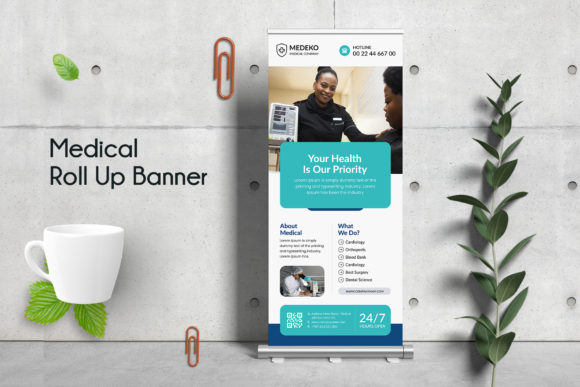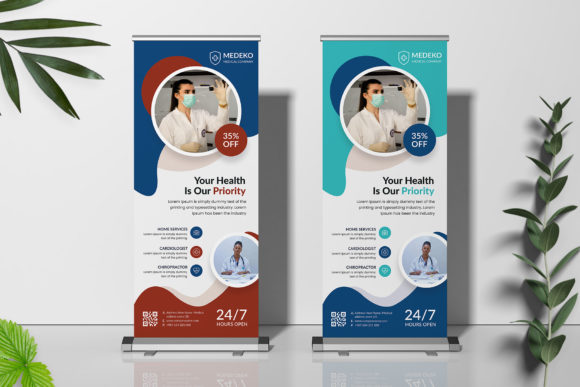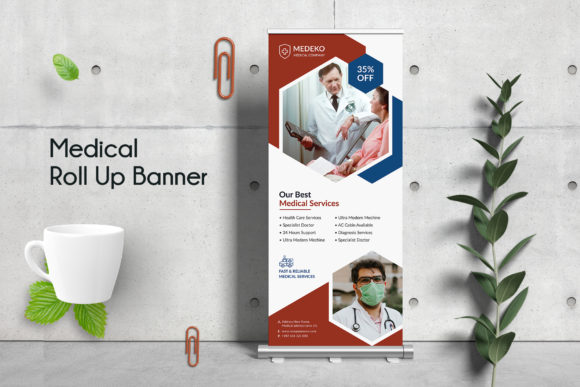
Stop the Scroll: Designing a High-Impact Medical Roll Up Banner
In the bustling environment of a medical conference, a busy hospital lobby, or a community health fair, you have roughly three seconds to make an impression. Standing tall among the crowd, the Medical Roll Up Banner remains one of the most reliable tools in physical marketing. It is the silent salesperson, the brand ambassador that works tirelessly without needing a break. However, the effectiveness of this tool relies entirely on its design. A cluttered, low-resolution banner can actually damage your credibility, while a polished, professional design establishes immediate trust.
If you have ever tried to design a large-format print from scratch, you know the headache: calculating bleed areas, managing layers, and ensuring that your typography doesn't pixelate when scaled up to 70 inches. This is precisely why having a robust starting point is invaluable. The Medical Roll Up Banner Template we are discussing today isn't just a static image; it is a comprehensive design system created to bridge the gap between a rough idea and a print-ready masterpiece. It is built for the realities of modern healthcare marketing, where clarity and professionalism are non-negotiable.
The Anatomy of a Professional Template
What separates a professional design asset from an amateur attempt? It usually comes down to the technical specifications and the user experience of the file itself. This specific Medical Roll Up Banner was built with Adobe Photoshop, utilizing a fully layered PSD format. This is crucial for designers who need granular control. You aren't just changing text; you are working with organized layers that allow you to swap out images, adjust color overlays, and manipulate individual design elements without breaking the composition.
Let’s talk specs, because in the world of print, details matter. This template is set up at 30 x 70 inches with a 0.25-inch bleed. For the uninitiated, the "bleed" is the safety margin that ensures your background extends to the very edge of the paper after trimming, preventing those awkward white strips along the border. Furthermore, the color mode is set to CMYK at 150 DPI. While web design relies on RGB, print demands CMYK to ensure that the deep blues, crisp whites, and vibrant accents you see on your monitor translate accurately to the physical banner. This attention to technical detail ensures a print ready experience, saving you from costly reprints.
Visual Appeal and Typography: Building Trust Through Design
The visual personality of this template leans heavily into modern medical aesthetics. It balances whitespace with high-resolution imagery, creating a sense of calm and competence. In healthcare branding, visual noise is the enemy. Patients and clients need to feel reassured, and a clean layout with a strong visual hierarchy achieves this instantly.
A significant feature of this design asset is its typography. The template utilizes Google Fonts and popular, free typefaces, specifically chosen for their legibility at large scales. When designing a medical roll up banner, you cannot use a complex script font or an overly decorative handwritten font for your main message. The body text needs to be a clean sans serif font that is readable from five feet away, while the headlines might use a bold display font to grab attention. This template demonstrates excellent font pairing, balancing a professional serif or sans-serif headline with readable body copy. This approach ensures that your brand identity is communicated clearly, reinforcing professionalism without sacrificing style.
Practical Applications and Editability
The true value of a medical roll up banner lies in its versatility. This template is designed to be a multipurpose tool for a variety of stakeholders. For the small business owner running a private practice, it serves as a lobby greeter. For the event organizer, it is essential wayfinding signage. For the marketing agency, it is a quick-turnaround solution for a client’s trade show booth.
Because the file uses Smart Objects for images, customization is seamless. You don't need to be a Photoshop wizard to use it. A Smart Object allows you to simply double-click a layer, paste your own photo, save, and watch it automatically conform to the perspective and lighting of the template. This is a massive time-saver for content creators and entrepreneurs who need to produce high-quality marketing materials quickly.
Here is a breakdown of where this design asset fits best:
- Trade Shows and Conferences: The primary use case. A cohesive booth design using this banner establishes immediate authority.
- In-Office Promotion: Use it in waiting rooms to highlight new services, vaccination drives, or specialist referrals.
- Community Outreach: When setting up a table at a local fair or school, a professional backdrop separates you from the hobbyists.
- Photography Backdrops: With the right lighting, these banners can serve as high-quality backgrounds for video interviews or product photography.
Design Strategy: Maximizing Your Banner’s Impact
While the template provides the structure, the strategy is up to you. One common mistake in editorial design and large-format printing is information overload. A roll-up banner is not a brochure. It is a billboard. You need to follow the "3-Second Rule."
1. The Headline: This should be the largest text on the banner. It needs to answer a question or state a benefit immediately. "Comprehensive Family Care" or "Advanced Dental Solutions" are better than just the name of the clinic.
2. The Visual: Use the Smart Object to insert a high-quality image that evokes emotion. Authentic photos of staff smiling or a clean, modern facility work better than generic stock photos.
3. The Call to Action (CTA): Never leave the bottom third of the banner empty. This is prime real estate. Place your logo, website URL, phone number, and a QR code here.
Remember to maintain consistency with your brand identity. If your logo uses a specific shade of blue, use the template’s color editing features to match the background or accent elements exactly. Consistency builds recognition, and recognition builds trust. By leveraging this high resolution, editable